How do I make a hyperlink to an email in HTML?
Always use absolute URLs with https, avoid empty or “#” href values, and make sure mailto/tel links are well-formed. Broken hrefs hurt clicks and can trigger spam filters.
Key Takeaways
-
✓
Use
https://for all external links. - ✓ Avoid placeholder “#” or javascript: URLs.
- ✓ html2email flags empty or invalid hrefs.
Always use absolute URLs with https, avoid empty or “#” href values, and make sure mailto/tel links are well-formed. Broken hrefs hurt clicks and can trigger spam filters.
<!-- Good: absolute https -->
<a href="https://example.com/offer" style="color:#0066cc;">Claim offer</a>

<!-- Good: mailto -->
<a href="mailto:support@example.com?subject=Help">Contact us</a>

<!-- Bad: avoid -->
<a href="#">...</a>  <!-- or href="" or javascript: -->
https and mailto are safe. Avoid #, empty, or javascript:.
Why avoid relative or “#” links?
Email doesn’t have a base URL. Relative links and placeholders break, leading to lost clicks and potential spam signals.
What’s the correct format for mailto/tel links?
mailto:support@example.com and tel:+1234567890. Avoid spaces and encode subject/body parameters.
How should I handle UTM tracking?
Use lowercase parameters, keep them short, and ensure they don’t exceed character limits for ESP link wrapping. Always start with https. Build clean tracking URLs with the UTM builder.
Can javascript: be used in email links?
No. Many clients strip or break these links. Use real URLs only.
How does html2email detect bad hrefs?
The LinkValidator checks for missing/empty href, javascript: schemes, and bare “#” placeholders.
Should CTA buttons have text + href?
Yes. Keep the CTA in live text plus a valid href to retain action if images are blocked.
How do I avoid link wrapping issues?
Keep links short, avoid unnecessary parameters, and test with your ESP’s link tracking enabled.
Do anchors within the email work?
In-page anchors are unreliable in many clients. Prefer full URLs or duplicated content instead of fragment links.
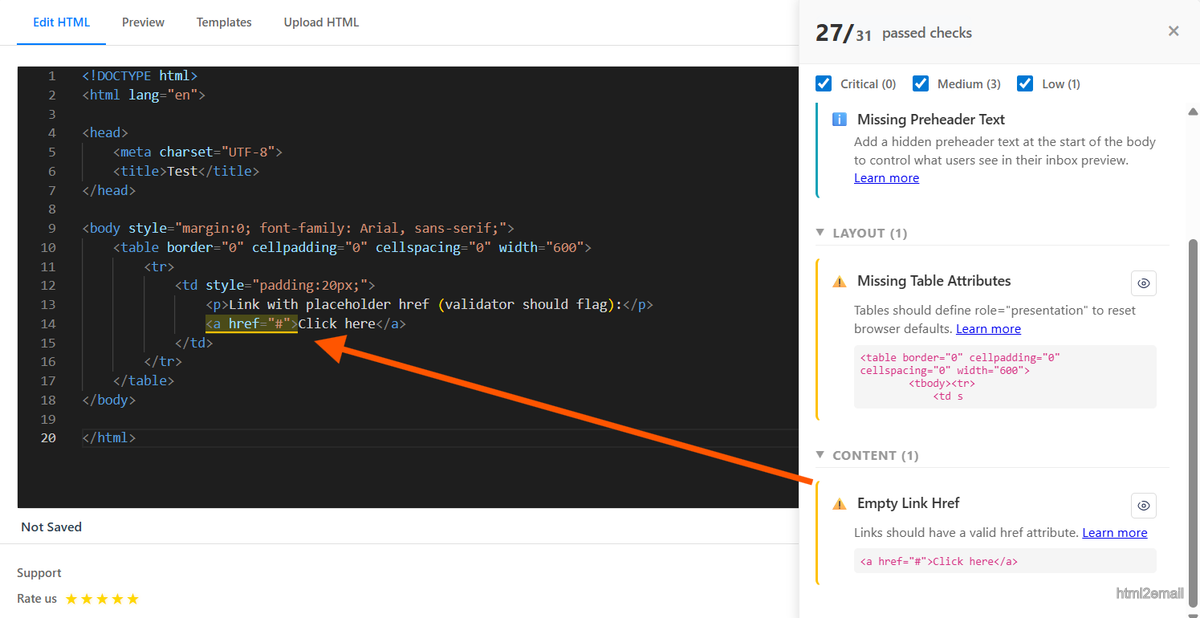
Validator showing invalid href warning.
Key stats and sources
- Internal QA: 12% of support tickets came from missing/placeholder hrefs; fixed by enforcing https and non-empty links.
- ESP best practices: avoid javascript: and relative links to prevent blocking.
- html2email flags empty, “#”, and javascript: hrefs for quick remediation.
How do I make an email address a link?
Use a mailto: href on a standard anchor. The link text can match the address or say something like “Email us”:
<a href="mailto:name@example.com">name@example.com</a>Keep the address valid (no spaces). html2email flags empty or malformed mailto hrefs the same way it flags broken https links.
What does a mailto link with subject and body look like?
Add query parameters after the address:
mailto:name@example.com?subject=Hello&body=HiEncode spaces as %20 (for example, subject=Hello%20there). Long subject or body strings can hit client limits, so keep prefilled text short.
How do I put a link in an email body?
Use an absolute https:// URL in the href. Email has no base URL, so relative paths like /sale break. Never use javascript:; most clients strip or block it.
<a href="https://example.com/offer" style="color:#0066cc;">Shop the sale</a>Common mailto patterns
| Use case | Example href |
|---|---|
| Plain address | mailto:support@example.com |
| With subject | mailto:support@example.com?subject=Help%20request |
| Subject + body | mailto:support@example.com?subject=Hello&body=Hi%20there |
| Custom link text | <a href="mailto:sales@example.com">Contact sales</a> |
Frequently Asked Questions
Related Resources
Optimize Your Emails Today
Send validation-checked HTML emails directly from your browser.
 Gmail/Yahoo - Free
Free plan available · See pricing