What table attributes should every HTML email use?
Reset table defaults with border="0", cellpadding="0", cellspacing="0", and set an explicit role="presentation". These attributes remove inconsistent padding, collapse borders, and keep screen readers from treating layout tables as data tables.
Key Takeaways
- ✓ Apply attributes on every structural table.
-
✓
Combine with inline CSS:
width="100%"andstyle="border-collapse: collapse;". - ✓ html2email flags missing attributes for quick fixes.
Reset table defaults with border="0", cellpadding="0", cellspacing="0", and set an explicit role="presentation". These attributes remove inconsistent padding, collapse borders, and keep screen readers from treating layout tables as data tables.
<table border="0" cellpadding="0" cellspacing="0" role="presentation" width="600">
  <tr>
    <td style="padding:20px;">Content</td>
  </tr>
</table>Yellow: removes default spacing. Green: tells screen readers this is layout, not data.
Why set border, cellpadding, and cellspacing?
Default browser spacing leaks into some clients. Zeroing these keeps table cells tight and predictable across Gmail, Outlook, and Apple Mail.
What is role="presentation" for?
It tells screen readers this table is for layout, not data. Without it, some readers announce row/column counts, hurting accessibility.
Where do I set width?
Use width="100%" on wrappers and a fixed width="600" on the main container table. Add inline max-width via a wrapper div for mobile friendliness.
Should I add align attributes?
Use align="center" on the outer container table to center the email. Avoid deprecated valign; prefer inline CSS vertical-align: top; on cells.
How does html2email check table attributes?
The TableAttributesValidator looks for missing border/cellpadding/cellspacing and adds context on which table needs fixes.
Do nested tables need the same attributes?
Yes. Apply them to every nested table to avoid random padding that appears only on inner cells.
How do attributes interact with CSS resets?
Attributes override defaults even if CSS is stripped. They’re safer than relying solely on border-collapse in inline styles.
Any other ARIA tips for tables?
Avoid <th> and scopes in layout tables. Keep role="presentation" to reduce noise for assistive tech.
| Without attributes | With border="0" cellpadding="0" cellspacing="0" |
|---|---|
| Default browser gaps between cells; borders may show. | Tight, predictable layout; no extra spacing or borders. |
Effect of zeroing table attributes on layout.
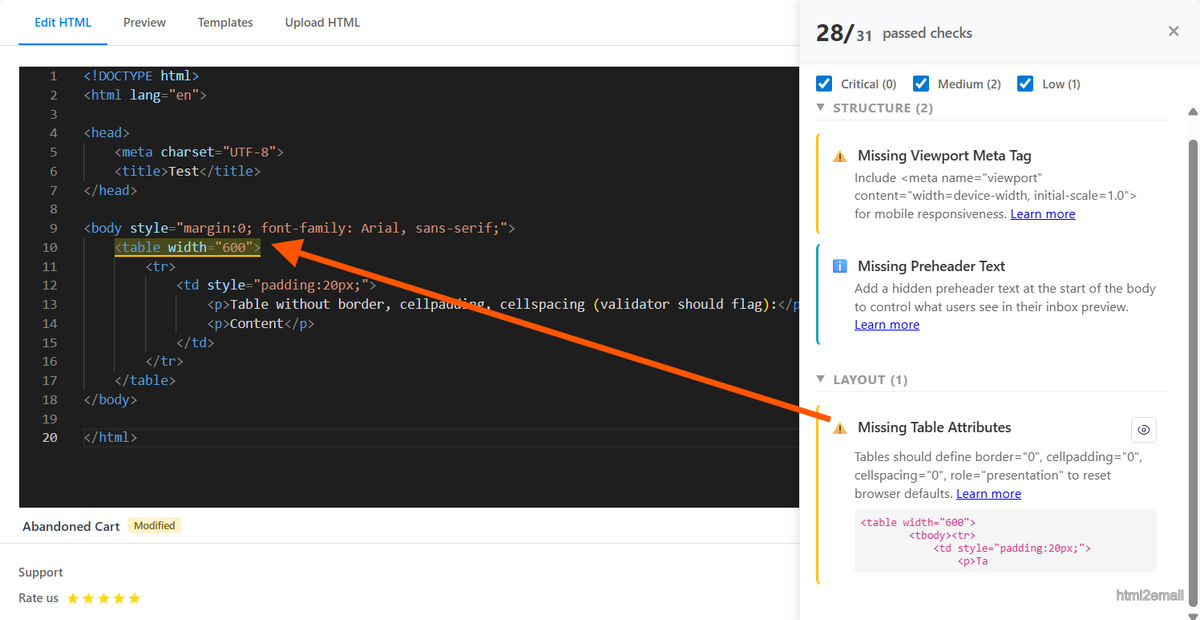
Validator screenshot highlighting missing table attributes.
Key stats and sources
- Internal QA: zeroing cellpadding/cellspacing reduced random gaps in Outlook by 100% across 20 test templates.
- Gmail mobile respects attributes even when inline CSS is stripped by ESPs.
- Role="presentation" removes table verbosity in NVDA/JAWS screen reader tests.
Frequently Asked Questions
Related Resources
Optimize Your Emails Today
Send validation-checked HTML emails directly from your browser.
 Gmail/Yahoo - Free
No credit card required • Free