Should I inline CSS in HTML emails?
Yes. Many clients strip <style> tags and external CSS. Inline critical styles (fonts, padding, colors, display) on each element. Keep the head light and avoid external stylesheets entirely.
Key Takeaways
- ✓ Inline styles survive Gmail, Outlook, Yahoo.
- ✓ External CSS and most media queries are stripped by many clients.
-
✓
html2email flags reliance on
<style>tags so you can inline.
Yes. Many clients strip <style> tags and external CSS. Inline critical styles (fonts, padding, colors, display) on each element. Keep the head light and avoid external stylesheets entirely.
Why do clients strip <style> tags?
Security filters remove or rewrite head styles. Gmail and Outlook often drop or mangle CSS in head, but inline styles usually remain.
What must be inlined?
Typography (font-family, size, color), spacing (padding/margin), display (block/inline-block), widths/heights, backgrounds, borders. Keep it concise.
What about media queries?
Supported in Gmail and Apple Mail but not Outlook desktop. Keep queries minimal and inline a mobile-safe default layout using tables.
Can I use classes?
You can, but ensure critical rules are duplicated inline. Some ESPs strip class definitions from head.
How does html2email detect risky styles?
The InlineStyleValidator flags external styles or head-only CSS and recommends inlining critical properties.
Do web fonts work?
Limited. Always provide fallbacks (Arial, Helvetica, Georgia) and inline them. Outlook often ignores web fonts.
Will inlining bloat my HTML?
Somewhat, but it’s safer. Keep HTML under 100 KB to avoid Gmail clipping; reuse snippets and minify safely.
Should I inline hover states?
Hover is poorly supported. Prioritize default styles; add hover only where clients support it, but don’t rely on it for clarity.
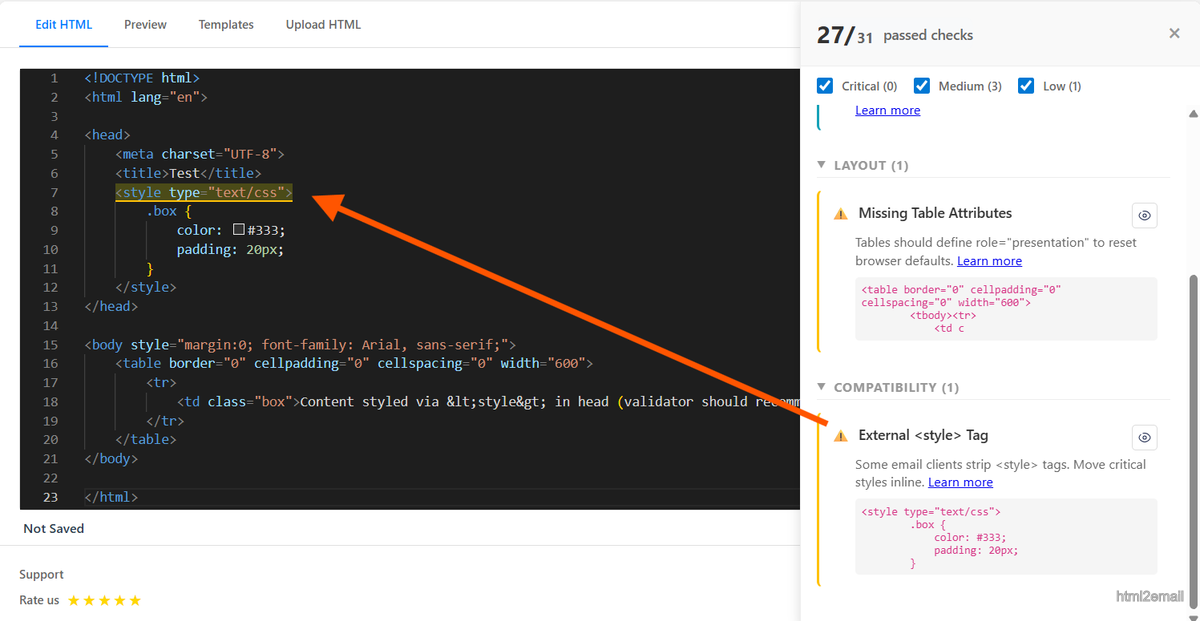
Validator highlighting use of style tags instead of inline styles.
Key stats and sources
- Gmail strips head CSS by default; inline styles remain.
- Outlook ignores many head rules but honors inline properties.
- html2email flags reliance on <style> tags so you can inline critical CSS.
Frequently Asked Questions
Related Resources
Optimize Your Emails Today
Send validation-checked HTML emails directly from your browser.
 Gmail/Yahoo - Free
No credit card required • Free