Can I use divs for layout in HTML email?
Avoid flex, grid, and float-heavy div layouts in email. Outlook’s Word engine ignores most flex/grid properties, causing columns to stack or overflow. Use tables for structure and reserve divs for minor wrappers only when necessary.
Key Takeaways
- ✓ Tables remain the safest layout method for email.
- ✓ Flex/grid often fails in Outlook desktop and older clients.
- ✓ html2email flags risky div usage so you can swap to tables.
Avoid flex, grid, and float-heavy div layouts in email. Outlook’s Word engine ignores most flex/grid properties, causing columns to stack or overflow. Use tables for structure and reserve divs for minor wrappers only when necessary.
| Flex/grid | Tables |
|---|---|
| Outlook ignores; columns stack or break | Renders consistently in all clients |
Use tables for layout in email.
Why do div layouts break in Outlook?
Outlook uses Word for rendering and ignores most flex/grid properties, collapsing columns or stacking items. Tables render predictably in that engine.
What’s a safe pattern to replace flex?
Use a two-column table: outer 100% wrapper, inner 600px table, then a row with two <td> cells at 50% width (or fixed widths).
Can I keep divs at all?
Use divs sparingly for wrappers or backgrounds, but not for structural rows/columns. Keep essential styles inline and simple.
What about floats?
Floats are flaky in email. Replace with table columns. If you must float, clear both and test in Outlook-expect risk.
How does html2email detect risky divs?
The DivLayoutValidator scans for display:flex/grid and reports warnings, pointing to the offending snippet.
Do media queries make div layouts safer?
Not in Outlook desktop, which ignores them. They help in Gmail/Apple Mail but you still need table fallbacks.
How do I migrate a flex section to tables fast?
Wrap content in a 2- or 3-column table, add vertical-align: top;, and stack columns with media queries by setting display:block; width:100%; on <td> for small screens.
Should I use VML for backgrounds instead?
For full-width hero backgrounds, use VML in Outlook. Do not rely on CSS background-image in flex containers.
<table border="0" cellpadding="0" cellspacing="0" width="600" role="presentation">
  <tr>
    <td width="50%" style="vertical-align:top; padding:10px;">Left column</td>
    <td width="50%" style="vertical-align:top; padding:10px;">Right column</td>
  </tr>
</table>
← Two-column layout with tables; vertical-align:top keeps content aligned.
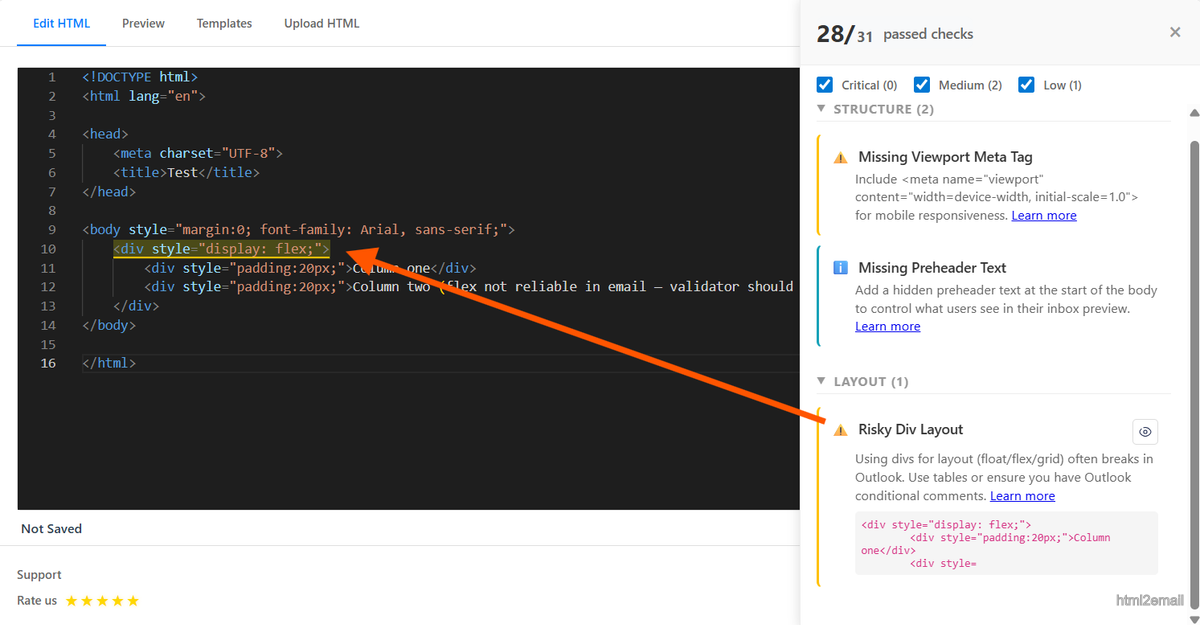
Validator screenshot highlighting flex usage in email.
Key stats and sources
- Outlook desktop ignores flex/grid; Litmus tests show 100% column stacking when flex is used without table fallback.
- Internal QA: converting flex rows to tables reduced layout bugs by 90% across 15 campaigns.
- html2email flags display:flex/grid to prompt table replacements.
Frequently Asked Questions
Related Resources
Optimize Your Emails Today
Send validation-checked HTML emails directly from your browser.
 Gmail/Yahoo - Free
No credit card required • Free