What is an HTML Email Preheader? (And How to Add It)
Learn what an HTML email preheader is, why it matters, and how to add hidden preview text to your emails.
Key Takeaways
- ✓ Preheaders are the preview text shown after the subject line in inboxes.
- ✓ They act as a "second subject line" to boost open rates.
- ✓ You can hide them in the email body using simple CSS.
- ✓ Tools like html2email automatically validate your preheader structure.
An HTML email preheader (also known as preview text) is the short summary text that follows the subject line when an email is viewed in the inbox. It provides context to the recipient before they open the message, acting as a "second subject line" that can significantly influence open rates.
What is an email preheader exactly?
Technically, the preheader is the very first text found in the HTML body of your email. Email clients like Gmail, Outlook, and Apple Mail automatically pull this text and display it next to or below the subject line in the inbox view.
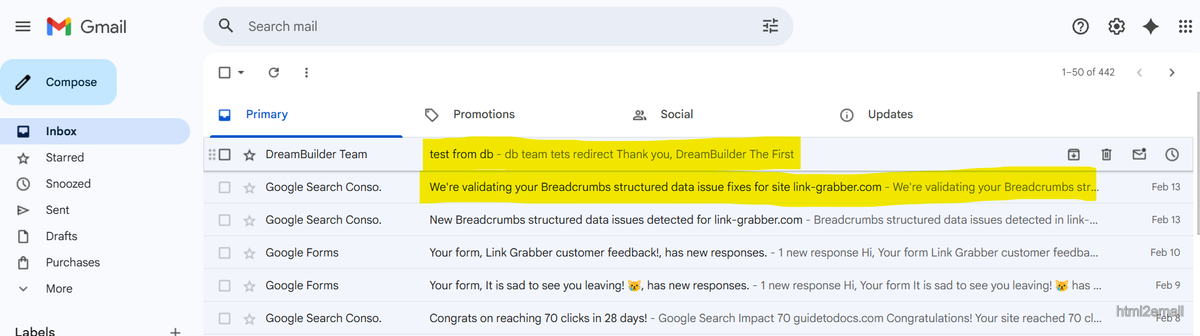
Inbox view showing subject line and preheader preview text.
If you don't define a custom preheader, the email client will grab whatever text appears first-often resulting in unhelpful snippets like "View in browser," "Unsubscribe," or image alt text.
Why does preheader text matter?
Preheaders are a critical component of modern email marketing for several reasons:
- Increased Open Rates: A compelling preheader can boost open rates by up to 7% by adding context or urgency to the subject line.
- Mobile Optimization: On mobile devices, the subject line is often truncated. The preheader takes up valuable screen real estate, offering a second chance to hook the reader.
- Professionalism: Custom preheaders look intentional and polished, whereas "View this email in your browser" looks like an oversight.
| Scenario | Typical impact |
|---|---|
| Custom preheader (e.g. short benefit) | Up to ~7% higher open rate |
| No preheader / "View in browser" | Wasted preview space; less context |
Why custom preheader text matters.
How to add a hidden preheader in HTML?
Ideally, you want your preheader text to be visible in the inbox preview but hidden when the user actually opens the email, so it doesn't clutter your design.
To do this, insert a <div> or <span> with specific CSS styles at the
very top of your email's <body> tag.
<!-- Hidden Preheader Text -->
<div style="display:none;font-size:1px;max-height:0px;overflow:hidden;">
  This is the text that will appear in the inbox preview but not in the email body.
</div>
← These styles hide the block in the opened email; clients still use its text for the inbox preview.
<body style="margin:0; padding:0;">
  <!-- Preheader: first element so clients grab it for inbox preview -->
  <div style="display:none; max-height:0; overflow:hidden;">
    Your preview text here.
  </div>
  <table>...rest of email...</table>
</body>
← Place the hidden preheader block first inside
<body> so clients use it in the inbox.
Why these styles?
display:none: Hides the element from most browsers.max-height:0px; overflow:hidden: Ensures it takes up no space ifdisplay:noneis stripped.font-size:1px; color:#333333: Fallbacks to make the text invisible or tiny if other styles fail.
The "White Space" Hack
Sometimes, if your preheader is short, the email client will still pull the next text (like "View in browser")
and show it immediately after your custom text. To prevent this, you can add a chain of "Zero Width
Non-Joiners" (‌) and non-breaking spaces ( ) to push the unwanted
text out of the preview window.
What are the best practices for preheaders?
To get the most out of your preview text, follow these guidelines:
- Length: Keep it between 40 and 130 characters. Too short, and other text might leak in; too long, and it will get cut off.
- Complement the Subject: Don't just repeat the subject line. If the subject is "Sale starts today!", the preheader should be "Get 50% off all shoes until midnight."
- Include a Call to Action: Encourage the click right from the inbox.
- Don't start with "View in browser": Always ensure your custom preheader comes before any utility links.
How to check if your preheader works?
Validating your email structure manually can be tedious. It's easy to forget the hidden div or mess up the CSS styles.
This is where the html2email Chrome extension helps. It includes a built-in Preheader Validator that automatically checks your HTML email for best practices before you send it.
The validator looks for:
- A
<div>or<span>as the first child of the body. - Presence of hiding styles like
display: noneorfont-size: 0. - The specific class name
preheader.
If you forget to include a preheader, the extension will alert you, ensuring you never miss an opportunity to optimize your open rates.
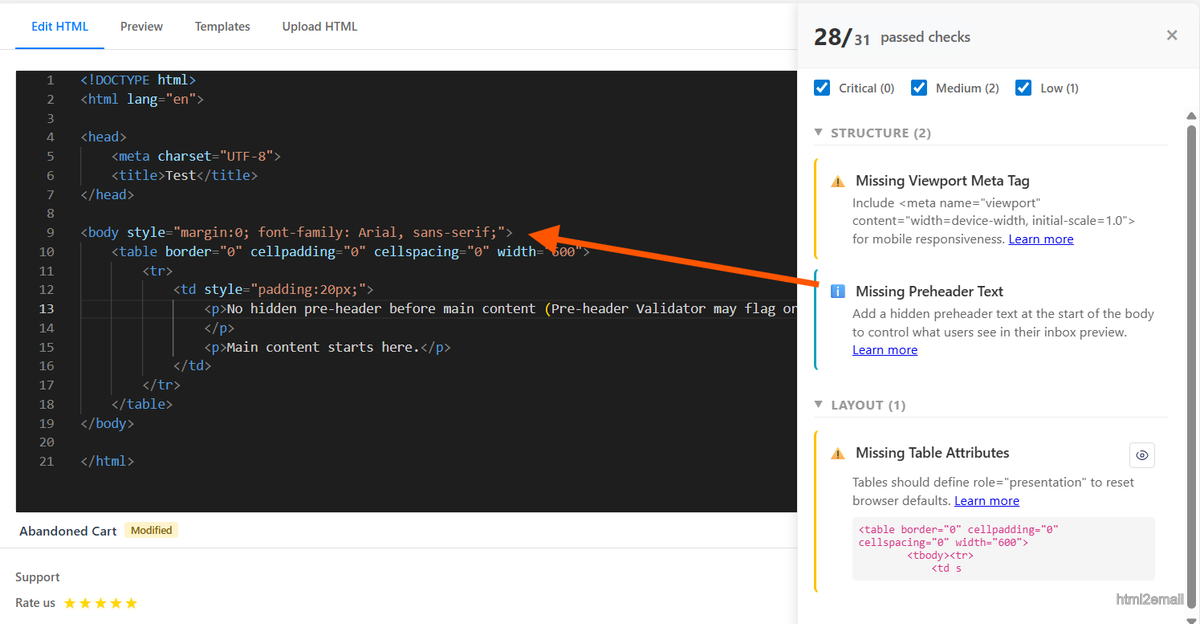
html2email extension Preheader Validator checking email for preheader.
Conclusion
The HTML email preheader is a small but mighty tool in your email marketing arsenal. By adding a simple hidden code snippet to the top of your emails, you can control exactly what recipients see in their inbox, driving higher engagement and more professional communication.
Start adding preheaders to your templates today, and use tools like html2email to ensure they are implemented correctly every time.
Frequently Asked Questions
Related Resources
Optimize Your Emails Today
Send validation-checked HTML emails directly from your browser.
 Gmail/Yahoo - Free
No credit card required • Free