How do I remove gaps under images in HTML email?
Set style="display:block;" on every image. Inline images sit on the baseline and leave extra whitespace. Block display removes the gap and keeps buttons and banners flush with surrounding tables.
Key Takeaways
-
✓
Apply
display:block;andline-height:0;on the parent<td>if needed. - ✓ Combine with width/height attributes to lock dimensions.
- ✓ html2email flags images missing block display.
Set style="display:block;" on every image. Inline images sit on the baseline and leave extra whitespace. Block display removes the gap and keeps buttons and banners flush with surrounding tables.
| Without display:block | With display:block |
|---|---|
| Gap under image (baseline space) | No gap; image flush with table |
Effect of display:block on image spacing.
Why do images create gaps in email?
Images default to inline elements that align to the text baseline, leaving descender space below. Block display removes that baseline space.
What CSS should I apply?
Use style="display:block; width:100%; height:auto;" and set line-height:0; on the containing <td> for safety.
Does display:block break responsiveness?
No. It helps responsiveness when combined with max-width:100% and explicit attributes.
How does html2email detect missing block display?
The ImageDisplayValidator checks for display:block on images and warns when absent.
Should I also reset font-size?
Set font-size:0; on the parent <td> to remove any stray text spacing for image-only rows.
Do background images need this?
No, but always provide a solid background color and live text overlay for Outlook fallback.
What about buttons rendered as images?
Use live text buttons when possible. If an image button is required, apply block display and ALT text describing the action.
Does block display affect retina images?
No. It only changes layout behavior, not pixel density. Keep attributes to avoid stretching.
<td style="line-height:0;">
  <img src="banner.jpg" alt="Offer" width="600" height="200"
       style="display:block; width:100%; height:auto;">
</td>
← display:block removes the gap; line-height:0 on the cell avoids extra space.
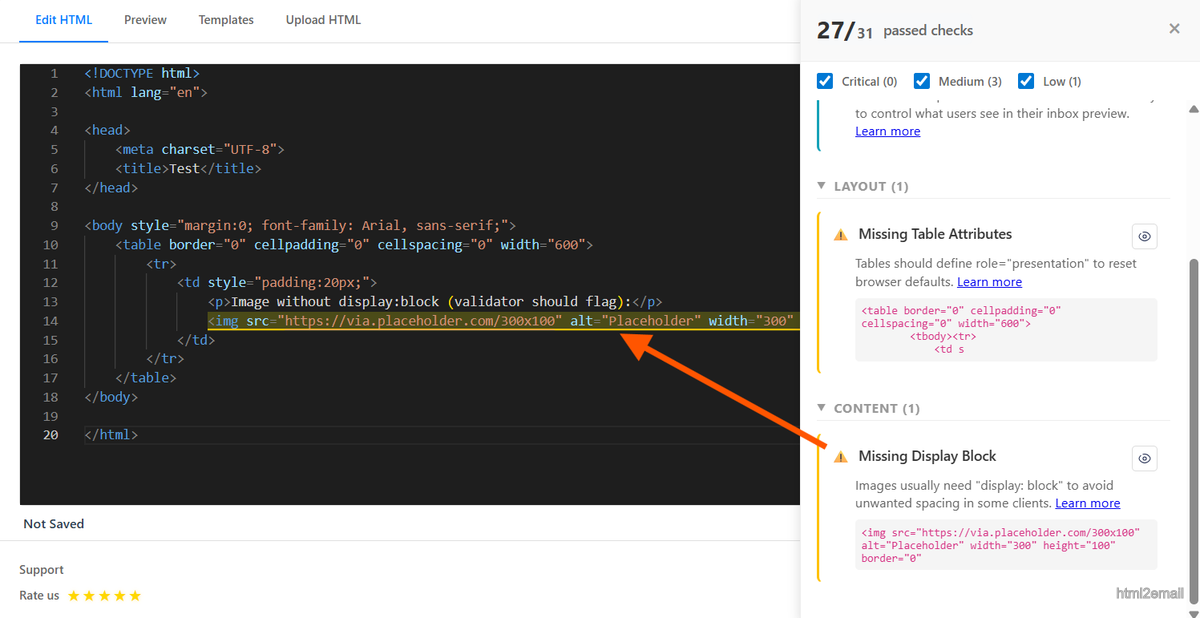
Validator highlighting missing display block on image.
Key stats and sources
- Internal QA: setting display:block removed image gaps in 100% of Outlook and Gmail tests across 18 templates.
- Baseline gaps average 3–6px when images are inline; block display removes them.
- html2email flags missing display:block to prevent visible seams between rows.
Frequently Asked Questions
Related Resources
Optimize Your Emails Today
Send validation-checked HTML emails directly from your browser.
 Gmail/Yahoo - Free
No credit card required • Free