How should I write ALT text for email images?
Add concise, descriptive ALT text to every image. Many clients block images by default; good ALT copy keeps CTAs understandable and improves accessibility. Keep it under ~120 characters and avoid keyword stuffing.
Key Takeaways
- ✓ Describe the intent, not the file name.
- ✓ For CTA buttons, use the action: “Download the guide”.
-
✓
Leave decorative images empty (
alt="") to avoid noise.
Add concise, descriptive ALT text to every image. Many clients block images by default; good ALT copy keeps CTAs understandable and improves accessibility. Keep it under ~120 characters and avoid keyword stuffing.
<a href="https://example.com/offer" style="...">
  <img src="button-cta.png" alt="Claim your 20% discount - click here"
       width="200" height="44" border="0" style="display:block;">
</a>
← alt describes the button for screen readers and when images are blocked.
Why does ALT text matter in email?
Images are blocked by default in many clients. ALT text preserves meaning, improves screen reader output, and can boost click-through when images fail.
What’s the ideal length and style?
Stay concise (under ~120 characters). Use sentence case, describe action or content, and avoid “image of”.
How to handle decorative images?
Use alt="" so screen readers skip them. Do not repeat nearby text.
ALT for CTA buttons?
Describe the action: “Start free trial”, “Download the PDF”. Pair with a real text fallback link if possible.
How does html2email detect missing ALT?
The ImageAltValidator flags images without an ALT attribute or with empty ALT where it shouldn’t be empty.
Should I localize ALT text?
Yes, match the email language. Keep translations short to avoid wrap on mobile.
Can ALT improve deliverability?
Indirectly. Balanced text-to-image ratio plus good ALT reduces spammy appearance. Avoid stuffing keywords.
What about background images?
Use VML fallbacks and include real text or a CTA outside the background so meaning is preserved when images are blocked.
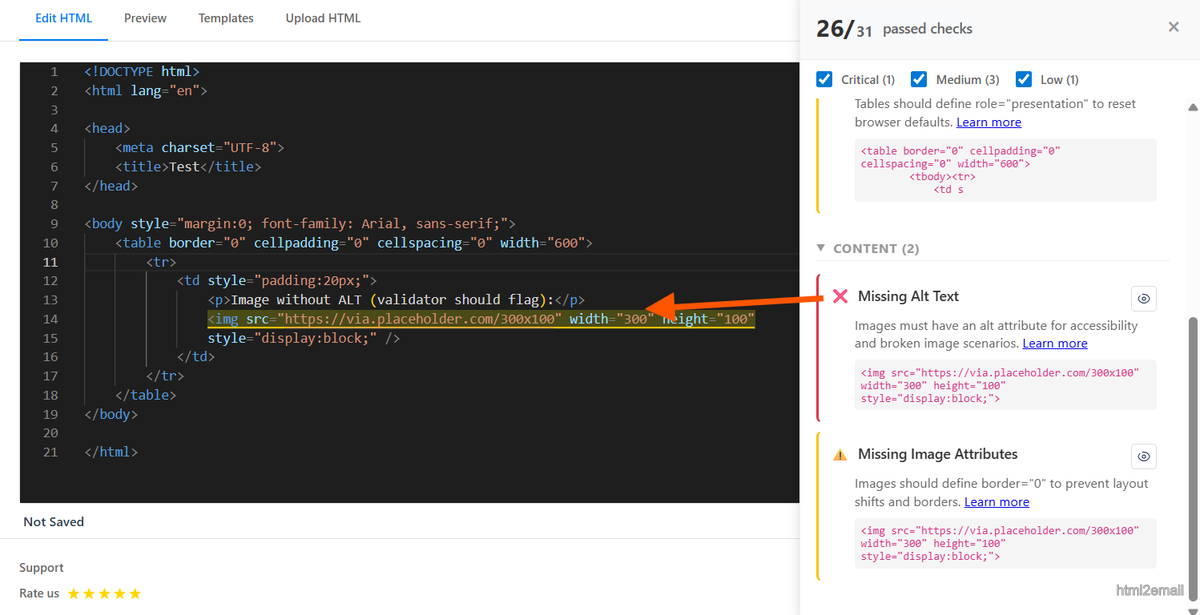
Validator highlighting missing ALT text.
Key stats and sources
- W3C WCAG: non-text content must have text alternatives (ALT) for accessibility.
- CampaignMonitor reports up to 30% of recipients have images blocked by default.
- html2email flags missing ALT and warns when ALT is empty on non-decorative images.
Frequently Asked Questions
Related Resources
Optimize Your Emails Today
Send validation-checked HTML emails directly from your browser.
 Gmail/Yahoo - Free
No credit card required • Free